
module 1 kali linux basic commands and controls
module 3 airodump usage and ifconfig command
module 3 airodump usage and ifconfig command
module 5 WPA 2 crack using crunch
module 6 cracking WPS with reaver and scripts\
module 6 cracking WPS with reaver and scripts\
module 7 wifi jammer script , macchanger
module 8 MITM attack
module 9 WPA2 KRACK attack
module 10 cracking wifi with WEP security
module 11 tool based hacking crack wpa wpa2 using fluxion
module 12 toolbased hacking wifi phisher attack facebook hacking
module 13 security process
general word list
Password
WPA-PSK Wordlist
Link:- http://zipansion.com/10zG7
If you cannot extract the zip then crack that zip password...Noobs in today's world...crack zip passwoed by the process below:-
Open password protected ZIP file by recovering password
iSumsoft ZIP Password Refixer is powerful ZIP password software that helps recover unknown password from encrypted ZIP archive file in the short possible time. Then you can open your password protected ZIP file with the recovered password.Step 1: Recover unknown password from password protected zip file
1. Download and install ZIP Password Refixer on your computer. Then launch this program.2. Click Open button. Browse for the password protected zip file and add it into this program.
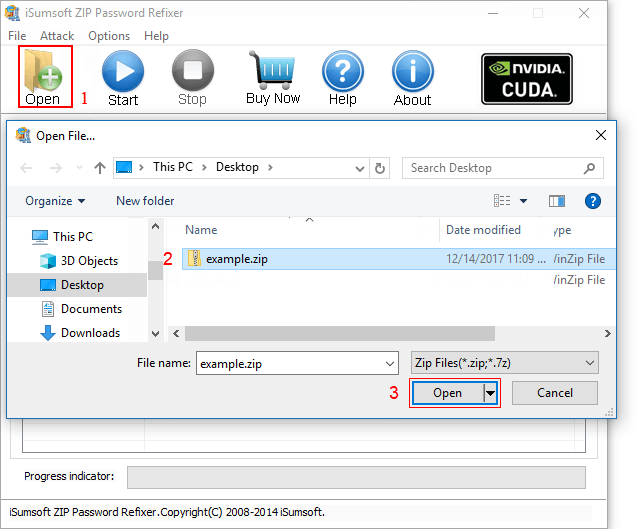
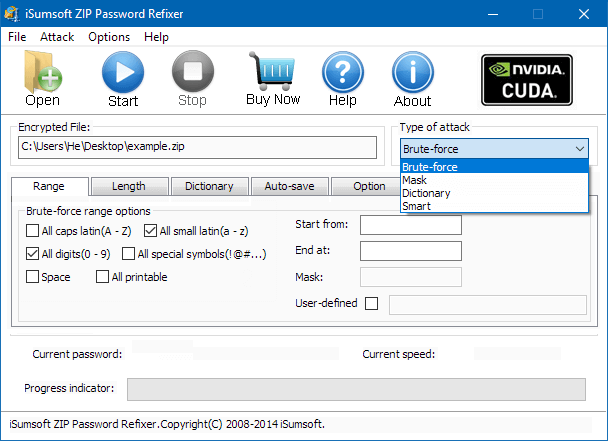
3. Selecting a proper password attack type and set relevant settings.
By default, the "Type of Attack" is set to Brute-force and the options that are checked include all capital and all lowercase letters. When you have no clue what the password may be, choose this attack, and there's no setting for this attack. It will try every possible key combination until the correct password is found. Due to the number of possible combinations of letters, numbers, and symbols, a brute force attack can take a long time to complete.
Learn more about password recovery with Mask and Dictionary attack.
4. Click Start button to start discovering the zip password.
When the zip password is found, this program will prompts you with password listed there.
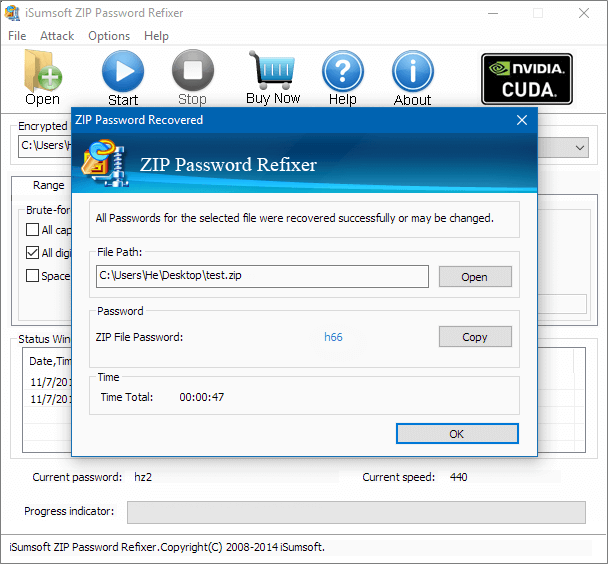
5. Open password protected zip file with the password
Then you can easily open your password protected zip file with the password. To do:
1. Double-click the ZIP files you want to unzip.
2. Enter the password for your ZIP files when the password window appears. And click on OK to go on.
3. Choose Extract All Files from the folder sidebar. Choose a location for your files and click Next then Finish.
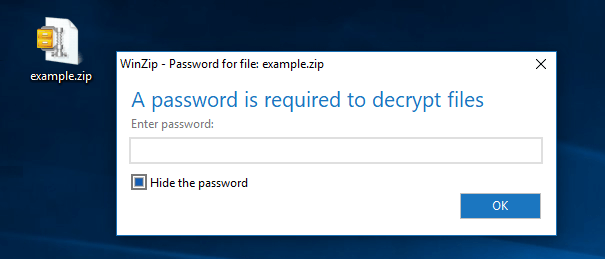
Tips: In order that you can open the password protected zip file without entering password later on, you are recommended to firstly extract the zip and then compress to a new zip by not setting password. So the zip file is not protected and you can directly open it without password.


No comments:
Post a Comment